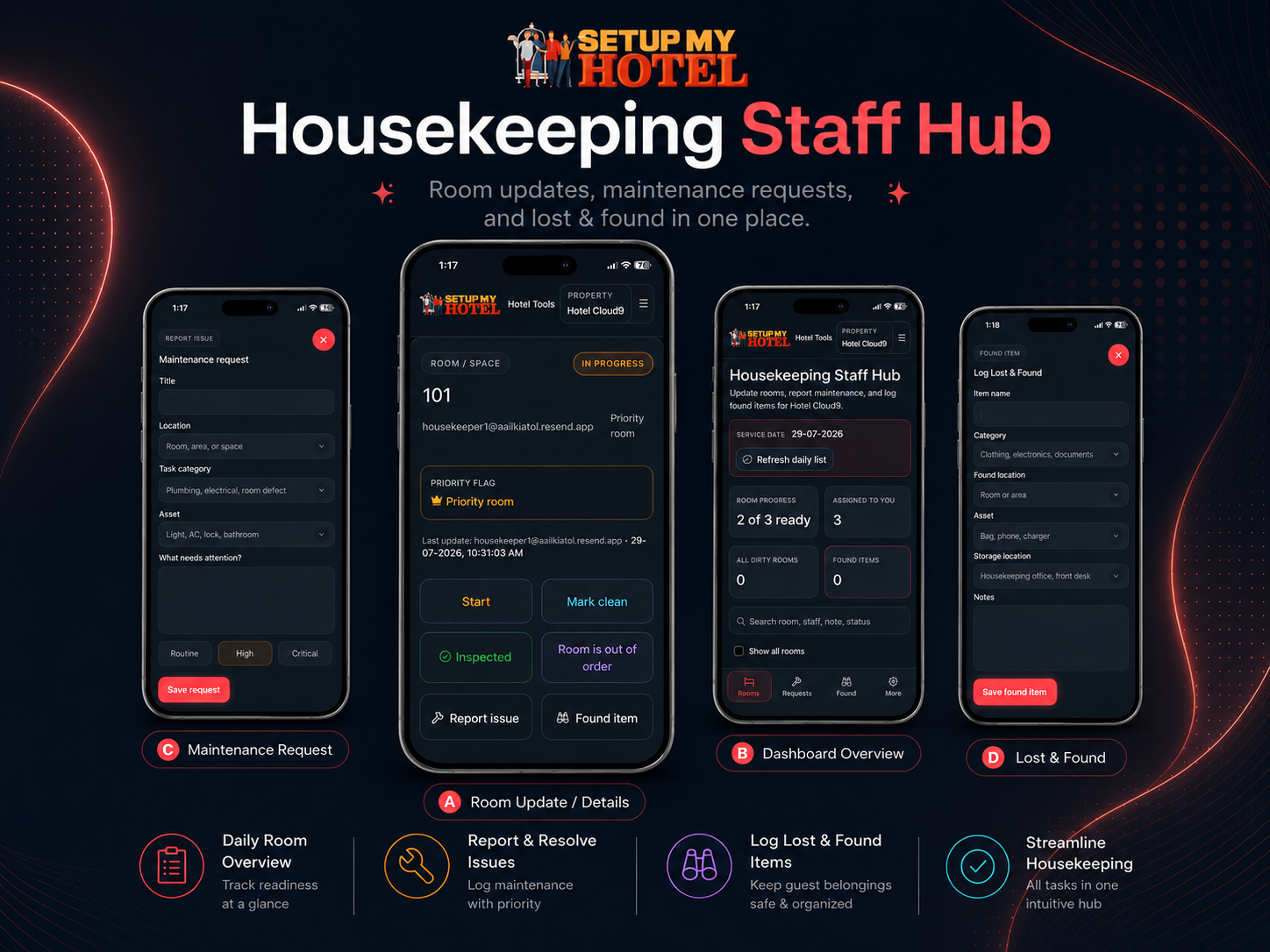
Housekeeping teams are constantly moving. Room attendants are cleaning rooms, supervisors are checking progress, maintenance teams are responding to issues, and the front office is waiting for rooms to become available.
When these updates rely on printed assignment sheets, phone calls, messaging groups or verbal handovers, information can quickly become outdated.
A room may already be clean, but the supervisor may not know. A maintenance issue may be reported verbally and then forgotten. A lost-and-found item may be placed aside without being properly recorded.
A shared housekeeping workspace can help bring all these activities together.
Give Staff a Simple Way to Update Room Status
Housekeeping staff should be able to update a room immediately after completing each stage of work.
Using a mobile-friendly Staff Hub, team members can view their assigned rooms and update statuses such as:
- Assigned
- In Progress
- Clean
- Inspected
- Out of Order
Instead of calling the supervisor or marking a printed worksheet, the staff member can update the room directly from a phone or tablet.
The updated status is then immediately visible in the main Housekeeping Workspace.
This gives supervisors a live overview of the operation without needing to repeatedly contact staff for progress updates.
Manage the Entire Operation From One Workspace
While room attendants use the Staff Hub, supervisors can control the day’s operation through the Housekeeping Workspace.
From one screen, the supervisor can:
- Review dirty and pending rooms
- Assign rooms to individual staff members
- Identify priority rooms
- Track rooms currently being cleaned
- Confirm which rooms are ready for inspection
- View completed and inspected rooms
- Add notes or special instructions
- Filter rooms by staff member, status or priority
This creates a clear operational picture throughout the day.
Supervisors can quickly see where work is progressing well and where additional support may be required.
Reduce Calls, Messages and Printed Worksheets
Printed maid assignment sheets are useful at the beginning of a shift, but they become outdated as soon as changes occur.
Guests may request late check-outs. Priority arrivals may be added. Rooms may require maintenance. Staff assignments may need to be changed during the day.
A live workspace allows these changes to be communicated instantly.
Staff can see their latest assignments without waiting for a new printed sheet, while supervisors can monitor progress without managing multiple phone calls or chat messages.
PDF reports can still be exported whenever a paper backup, offline handover or physical record is required.
Report Maintenance Issues From the Room
Housekeeping staff are often the first team members to notice maintenance problems.
These may include:
- Faulty lights
- Leaking taps
- Damaged furniture
- Air-conditioning issues
- Television or appliance faults
- Bathroom defects
- Broken room fittings
When staff can log a maintenance request directly from the Staff Hub, the issue can be recorded while they are still inside the room.
This reduces the risk of the issue being forgotten or incorrectly communicated.
The request can include the room number, details of the problem and any relevant notes, giving the maintenance or supervisory team clearer information to act on.
Keep Lost-and-Found Records Organised
Lost-and-found items also need to be documented promptly.
Instead of relying on handwritten notes or verbal reporting, housekeeping staff can record the item through the Staff Hub.
The record can include information such as:
- Room number
- Item description
- Date found
- Staff member
- Storage or handover notes
Having a consistent process improves accountability and makes it easier to respond when a guest contacts the hotel about a missing item.
Improve Communication Between Departments
Live room status information is not only useful for housekeeping.
It can also support better coordination with:
- Front office
- Maintenance
- Duty managers
- Operations teams
When room information is current, the front office can better understand which rooms are ready, which are still being cleaned and which may be delayed because of maintenance.
This can help reduce unnecessary interruptions and improve the guest arrival experience.
Create a Clear Daily Record
A daily housekeeping snapshot can provide a useful operational record for each service date.
It can help teams review:
- Room assignments
- Completion progress
- Priority rooms
- Out-of-order rooms
- Staff workload
- Notes and operational issues
These records can support shift handovers, management reviews and future planning.
Simple Tools Can Make a Significant Difference
Housekeeping software does not always need to be complicated.
For many hotels, serviced apartments, lodges and smaller accommodation businesses, the most important requirements are straightforward:
- Assign the rooms
- Show staff what needs to be done
- Update room statuses
- Highlight priorities
- Record maintenance issues
- Log lost-and-found items
- Give supervisors a live overview
The free Housekeeping Workspace and Housekeeping Staff Hub from SetupMyHotel.com have been created around these everyday operational needs.
Supervisors can manage assignments and room progress from the Workspace, while housekeeping staff can use the Staff Hub to update rooms and report issues from their own devices.
The tools work together to provide a simple and practical way to manage daily housekeeping operations without depending entirely on printed sheets.
The Housekeeping Workspace is available free to use at: